|
|
HDTVs / NEC / PlasmaSync 42VM5 Specifications
NEC PlasmaSync 42VM5 Plasma Monitor (42VM5)

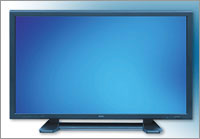
|
|
 Product Sheet User's Manual Product Sheet User's Manual
|
More NEC
HDTVs and Monitors |
|
|
| Screen Size |
42" Diagonal |
| Display Technology |
Plasma |
| Resolution |
853x480 |
| Pixel Pitch |
1.08 H |
| Aspect Ratio |
16:9 |
| Contrast Ratio |
** |
| Brightness |
** |
| Displayable Colors |
6.9 billion colors |
| Viewing Angle |
160° |
| Display Life |
60,000 hours |
| Response Time |
** |
| Screen Filter |
Anti-Glare |
| Compatibility |
| Color System |
NTSC, PAL, SECAM |
| Formats |
480i, 480p, 720p, 1080i, 1035i, 525i, 525p, 540p, 625i, 625p |
|
|
| S-Video |
4-pin DIN |
Back |
| Composite |
BNC |
Back |
| Composite |
RCA |
Back |
| Component |
3 RCAs |
Back |
| Component |
3 BNCs |
Back |
| RGB In |
5 BNCs |
Back |
| VGA In |
15-Pin Dsub |
Back |
| DVI Digital Input |
24 pin DVI-D |
Back |
| RS232 |
DB-9 Dsub |
Back |
| General |
| Bezel Color |
Gray
|
| Power Supply |
120V - 240V |
| Power Consumption |
270 Watts |
| Standby Power |
** |
Dimensions (W x H x D)
(without stand or speakers) |
40.1" x 20.4" x 3.5" |
| Weight |
63.0 lbs. |
| Speakers |
8.0 W × 2
|
| FCC Class |
FCC Class A, Commerical |
| Warranty |
1 year |
| MSRP |
$2,495 |
| Production Status |
Out of Production |
| Last Ship Date |
Aug 2006 |
| Additional Features |
| 3D Picture Support |
**
|
| 3:2 Pull Down |
Yes |
| V-Chip |
No |
| Closed Captioning |
Yes |
| Picture-In-Picture |
No |
| ** this item is either not applicable, unpublished, or unknown |
| NEC's Description |
User Controls
Direct Access: Power on/off, input selection, volume up/down, OSM access, (Control Lock Switch located on input panel)
Remote Control: Power on/off, input select, volume, mute, wide, display, off-timer, OSM control, cursor, pointer, zoom, auto, select
OSM: Picture - Contrast, brightness, sharpness, color, tint, color temperature, white balance, picture mode, noise reduction, gamma, low tone and color tune
Audio - bass, treble, balance and audio input
Image Adjust - aspect ratio mode, vertical position, horizontal position,
vertical height, horizontal width, fine picture, picture adjust, auto picture
DVI Setup
Option 1: OSM on/off, BNC Input, D-sub Input, RGB select, HD select,
Input Skip, All Reset
Option 2: Pwr. Management, Cinema Mode, Long Life Mode, Closed Captioning
Option 3: Timer, Pwr. On mode, Control Lock, IR Remote, Loop Out, ID
Number, Video Wall Advanced OSM, Language, Color System, Source Information
It's like…realizing your vision.
Command awe-inspiring performance.
NEC's commercial plasma displays deliver unsurpassed image quality and reliability in any viewing environment with adaptable cutting edge technologies in a sleek, flexible design.
Brilliant. Crystal clear larger than life images.
Flexible. NEC plasma displays are adaptable for any commercial application.
Reliable. Unsurpassed professional grade reliability and service.
|
|
LCD TVs
Shipping
 82" - MultiSync LCD8205
70" - MultiSync P701
70" - MultiSync P701-AVT
65" - V651
55" - X551S
55" - V551
55" - V551-AVT
55" - P551
55" - P551-AVT
55" - E551
55" - E552
52" - S521
52" - S521-AVT
52" - MultiSync P521
52" - MultiSync P521-AVT
46" - MultiSync P461-AVT
46" - MultiSync P461
46" - V461
46" - S461
46" - S461-AVT
46" - MultiSync X462UN
46" - E461
46" - V461-2
46" - X461UNV
46" - X461S
46" - X462HB
46" - E462
46" - V462
42" - V422-AVT
42" - E422
42" - E421
42" - V421-2
40" - S401
40" - S401-AVT
40" - MultiSync P401-AVT
40" - MultiSync P401
32" - E321
32" - V321-2
32" - E322
32" - E323
|
04/18/24 - 04:13 PM PST | ©1999-2024 HDTVSolutions.com
|
|