Plasma, LCD, and Rear Project Displays
ProjectorCentral Plasma, LCD, and Rear Project Displays Big Screen Forums
You are viewing HDTV Solutions.com from the United States  United States
        Home  

  Send this Page Home Theater HDTV > Flat Screen Reviews > Review - VIZIO GV42L 42" LCD HDTV    


VIZIO GV42L
Performance

Features

Ease of Use

Value


VIZIO GV42L LCD TV
  Size: 42" LCD TV
  Resolution: 1366x768
  Contrast: 1600:1
  MSRP: $1,099
VIZIO 42" GV42L LCD HDTV Review
Dick De Jong
August 31 2006
HDTV Solutions

Comfortable – that description may not seem to be the most praiseworthy profile for a 42" LCD; but believe me, comfortable is a very valuable and illusive commodity in the HDTV marketplace. VIZIO's new GV42L 42" LCD is comfy.

Before I elaborate on the merits of comfortableness, let's take care of the formalities. The GV42L LCD HDTV has a resolution of 1366 x 768, with an 8 ms response time, an 8-bit processor yielding 16.77 million colors, which are all industry standards for a 42" LCD in this price range. (Its 1600:1 contrast ratio is above the usual 1000:1.) And, oh, by the way, this VIZIO pumps out a bright, luscious high definition image.

But it's this sensation of slipping into a comfort zone when using the GV42L that distinguishes this HDTV in the marketplace. The VIZIO product designers must be extremely simpatico with the customer, because most of the TV's features work like you think they should.

For example, if you are looking at a spec sheet, you will often read that a TV has an integrated NTSC/ATSC tuner, which means that the tuner is part of the TV. But on many sets, you will find that, in reality, the NTSC (analog) and ATSC (digital) tuners are segregated. They have separate inputs for the antenna and when you are channel surfing, you have to switch your remote between the NTSC and ATSC channels.

With the GV42L, the tuners are truly integrated. They share the same antenna input. When you perform one Auto Search, both analog and digital channels are located. And as you surf through the channels on the remote, you progress through both NTSC and ATSC. VIZIO even has a hyphen (-) key on the remote so you can select digital channels like 36-2. Once you experience this all-too-convenient system, you realize someone at VIZIO is thinking about your well-being.

Out of the Box
At 74 pounds, (with stand and speakers), the GV42L cannot claim the one-man, one-monitor maneuverability of its lighter 32" siblings. But it does possess many of the other necessary plop-ability (how quickly can you pluck the TV from the box, plop it down, plug it in, and plop yourself on your favorite couch to enjoy it) features.
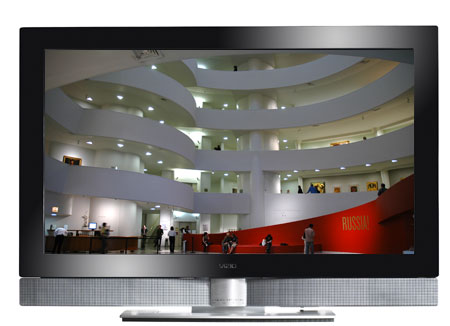
VIZIO 42" GV42L LCD HDTV

Situated below its de rigueur black bezel are twin 10W silver speakers and a matching sturdy stand, all of which are detachable if you want to wall mount the unit. Without the stand, the monitor's depth measures a slender, Twiggy-like 4.3". In the middle of the bezel at the bottom, VIZIO logo lights white when the TV is powered on. During the day, it's not that noticeable; but at night, the glow begins to intrude.
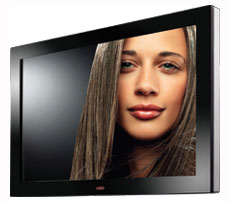
The GV42L without speaker and stand

The TV does exhibit a bit of pizzazz with its silver racing stripe side panels. On the right hand one, the Control buttons (Power, Channels, Volume) are out of sight, but not out of reach.

One glance at the back and I realized that not everything was peaches and cream. Though VIZIO provides an extensive selection of connections, they are facing down. I'm just not convinced that side mounting the connectors would make wall mounting more difficult or less elegant.

Returning to the comfort zone, VIZIO does include two HDMI connections, which will make your life more mellifluous especially if you have two HDMI sources to plug in, like I do. Also, the GV42L has one set of RCA stereo audio inputs to accompany the HDMI (1) connector, which is essential if your source machine only has DVI output like the OPPO DVD player used in our setup. Audio is not conveyed through a DVI connector. So to transmit audio from the player to the TV, I hook together the stereo Outs on the DVD player to the Ins on the TV.
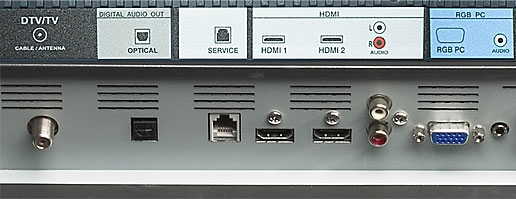
Back panel digital ins and outs

Of course, it would be more charitable of VIZIO if they added another set of audio inputs for the orphaned second HDMI connector; but in most configurations, the audio tasks will be performed by an external sound system that is much more robust than the TV's speakers. For that, the back panel includes an SPDIF optical digital output. If you are receiving digital channels OTA (over the air) with your antenna, you can send the digital audio signal out the SPDIF to your sound system. You can route analog audio out through the separate set of RCA stereo analog audio outputs.
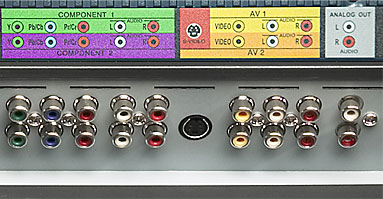
Back panel analog ins and outs

The NTSC/ATSC/QAM HDTV tuner worked admirably, scanning the digital and analog signals from my rabbit ears antenna and building a list of all the available channels. The GV42L also includes the V chip and companion parental controls. And for those of you who need more ocular stimulation, the TV provides PIP (picture in picture), and POP (picture-by-picture).

Setup
To ensconce even the novice in the comfort zone, VIZIO provides poster-size, highly graphic, informative, step-by-step, installation and programming instructions with a color-coded chart for all the possible AV connections. And as you dig deeper into the nuances of the setup menus, the 77-page manual is well written in plain English. Though don't expect a highly detailed or technical description of the more esoteric features like Color Transient Intensity or Adaptive Luma.

As usual, to calibrate the monitor, I attached the DVI out on the Oppo OPDV971H DVD player to the HDMI input on the VIZIO and used the Digital Video Essentials DVD test patterns to adjust black level, white level, and color bias. Also, for the first time, I tried the Datacolor Spyder TV Pro system to tune the TV. (My next review will be devoted to Spyder.) The settings determined by Spyder were very similar to the ones from the Digital Video Essentials process. And both proved to be fairly close to the GL42L's default settings.

Both the DVE and Spyder methods required numerous tweaks to the controls in the OSD, (On Screen Display), Picture Adjust Menu. I'll admit the experience was almost pleasurable, which is a shocking statement since I usually can't abide calibrating. One of my nemeses in the process is an OSD that persists in hogging the screen when you are trying to see your test patterns. Rereading my review, (of five months ago), of a VIZIO plasma TV, I see that it was guilty of this perturbation. So hats off to VIZIO for rectifying this annoyance. Now when you select a control like Contrast, the main menu disappears and the adjustment slider drops unobtrusively to the bottom of the screen.
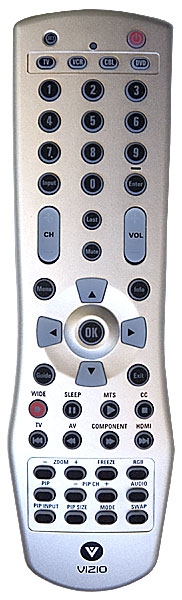
With that problem solved, now, the VIZIO design team should take another stab at their universal remote control. This multi-component-capable unit is backlit, thank you very much. But the buttons are too small to accommodate the hard-to-read labels stenciled on them. In the dark, the backlight just does not suffice for deciphering the squashed lettering.

Beyond the usual Brightness, Contrast, Color, Tint, Sharpness, and Color Temperature controls, the GV42L also adds DNR (Digital Noise Reduction), Black Level Extender, White Peak Limiter, Color Transient Intensity, Flesh Tone, Adaptive Luma, and Dynamic Contrast adjustments. The manual does provide basic guidance for using these features, but that still means most of the tweaking with these controls will be a matter of experimentation. Luckily, the Reset All Settings function should rescue you if you stray too far off course.

To test how the monitor worked with a computer source, I attached a Dell Inspiron 1505 with a 15-pin D-Sub RGB (VGA) cable, (which is not provided), to the RGB PC input. Heeding the manual's suggestion, the computer's resolution was set to 1366 x 768 at 60Hz. Judging from the playback of the DVE's geometry test patterns (through the laptop's DVD player), the GL42L displayed no cropping. This is good news for you well-cleated virtual warriors as you gird your loins in preparation for HD gridiron glory in Madden NFL 07. Also, under the Picture Mode control, you can select Custom, Standard, Movie or Game.

Performance
After plugging in the Dish Network HD receiver with a DVI to HDMI cable, as a touchstone, I switched to SportsCenter on ESPNHD. The GV42L passed this litmus test with flying Technicolors. Now, after watching a lot of HD programming, it is painfully obvious that the SportsCenter set is not indicative of the real TV world.

Most of the time, HD broadcasts are a delight to watch, though they can be fickle. For example, the 10th Annual V Festival concert on HDNet included a lot of bright strobe light effects, which revealed a full screen grid artifact. I thought I was looking into the HD Matrix. With a few exceptions like this, the GL42L handled HD sources with eye-pleasing aplomb. One consistent impression I had was "bright," not retina-rattling radiant, but luminous. I could perceive finer details and colors – making the line between the HDTV Smallville and the big screen Superman Returns begin to disappear. (Though I don't think Kate Bosworth's spiritless Lois Lane can hold a candle to Smallville's Erica Durance's spunky Lois. But that's a topic for another day.)

While HD might be capricious, SD can be seditious. Though the GV42L does the best it can with most SD programs, dealing with the more ornery ones can and does get ugly. I am realizing that a 32" HDTV can mask more SD shenanigans than its 42" brethren. But no matter what size HDTV you buy, please treat it to a steady high fiber, high definition diet.

With sources from the laptop, the GV42L looked great. I was expecting that its 42" size might be too large for normal 19" LCD tasks. But images in Photoshop were gorgeous. The DVD playback through the computer was top notch. Though at this size, I think I would still prefer a 1920 x 1080 resolution monitor, which would provide a little more screen real estate.

Almost every HDTV spec sheet nowadays states its viewing angle as 170 degrees or more. The manufacturers are dreaming. Yes, you can see the image at that angle, but it is usually degraded beyond acceptable. That's the case with this VIZIO. Without getting my protractor out, anything farther than 55 or 60 degrees off center, (a viewing angle of 110 to 120 degrees), became too washed out. And that angle becomes less if you are off center in two directions, for example sitting to the side and below the screen.

Conclusion
The GV42L HDTV produces a bright beautiful high definition image. And I appreciate how VIZIO has added features to this new model and improved its usability while still maintaining a competitive price. I think that you'll find watching HD on the GV42L will definitely put you in your comfort zone.

Star Ratings
First, realize, that ratings are relative to when the review was written. The obvious example is Value, what you could purchase for $2000 two years ago or even two months ago would seem like a bad value for that price now.

Second, I have yet to give a 5 Star rating, which I am reserving for truly outstanding accomplishment.

Performance - 4
With HD sources, I would give it a 4.5. Even though it is not made for SD, I believe it could do better.

Features – 4.5
With this model, VIZIO has upped the ante on the features they are including. I love the two HDMI inputs and the audio outs. The truly integrated tuners are a big plus. And the extensive Picture Adjustment controls will keep most tweakers satiated.

Ease of Use – 4.5
For those of you who don't plan on calibrating your monitor, the out of the box settings are close enough for you to plug and play. If you do want to become more intimately involved with your HDTV, the manual is helpful. From the tuners to the color-coded connectors, the more you use the GV42L, the more you realize that the VIZIO design team is watching out for you.

Value – 4
I'm a tough grader on Value, so 4 is a high mark.

Bookmark:   Digg     del.icio.us     Reddit     Google

Reader Comments

Posted Feb 3, 2010 5:19:45 AM

By Larry Bolling

I have bought 3 Vizio tv,s and 2 have had problems.One was under warranty but one was not.I was told the same thing.Would cost as much to fix as it cost new.I would not buy a Vizio product ever again!

Posted Jan 8, 2010 2:47:37 PM

By Daniel

Just same problem as all others, 14 months and a junk TV that I purchased at Sears for $1200. Nobody wants to do anything. Sounds like Sams is the place to buy things. Sears and Vizio can KMA. Not shopping there or buying a vizio again. I will warn everyone I know. Shame that Vizio is the only US based company that makes TVs. I will be fileing a claim with the BBB. Lot of good that will do though.

Posted Jan 8, 2010 12:38:46 AM

By jc420

sep 08 purchased vw42lfhdtv10a at wal mart in nov 09 guess what thats right it has choppy sound with poor picture for about 2 minutes then picture goes black and audio works perfectly go figure another piece of s#!t VIZIO!!!!!!!!!!!!!

Posted Jan 3, 2010 5:33:30 PM

By EC224

Same here, bought it November of `07, it died 4 days short of 2 years old. Called service, to repair it on the 19th of Nov. they put a new MAIN board in it, still dead, unrepairable. The guy who came to fix it said he has had more Vizio`s die than any other brand, he told the company who holds the service contract not to send him on any more Vizio calls, I`m getting a Samsung, don`t buy VIZIO.

Posted Dec 17, 2009 6:32:36 PM

By Mark

I have a GV42L that I have only had about 1 year and 10 months. The TV now is what the certified Vizio repair shop says is NOT REPAIRABLE. I would not recommend this product. Vizio does not stand behind the panel (screen) if it goes bad. If you purchase this or any other item from Vizio purchase the extended warranty because it is going to go bad. Also if you think that when you read the manual you are going to find out anything about your warranty you will not. My manual says for warranty information see page 69 but this page is a glossary index.

Posted Nov 24, 2009 8:03:00 PM

By cris

I have Vizio VO47L FHDTV20A, when I switch input for ''tv'' (antenna ) my tv stop working, remote doesn't work, button an tv doesn't work, view is frozen, i can only plug off power, when I plug in back works for few minutes and the same. I tried 3 brand new different antennas and the same. Others inputs AV1, AV2, HDMI works

Posted Nov 23, 2009 9:15:48 PM

By Richard Meredith

I am a two time losser of the 42" Vizio. The first one i purchased failed to operate properly after 6 months. Visio was kind enough to replaced it with another. With less than two years on the second set. The picture went dead, still had sound. And the remote would turn power onto the set, but not off. After talking with a vizio tech i was informed it would cost to much to repair. I feel sorry for us.

Posted Nov 3, 2009 7:59:32 PM

By Gary P

A year and 6 month after purchasing a 42" Vizio, I went to turn it on tonight and "pop" no picture. It did however, have sound. I did have a high dollar surge protector on it, but no storms or any other electrical anomolies in this area. It is out of warranty so I'm sure I'm out of luck. After reading of all the other people who have had the exact same problem and no help from tech support I'm not wasting my time but guess what brand TV I won't bub next time and I will stand in Sam's, Walmart, etc. and tell other people what a POS the Vizios are.

Posted Oct 27, 2009 5:17:34 AM

By matt

bought a 42 inch vizio 13 months ago. same story im reading here! sound but no pic. vizio said its not under warr., got a sorry, but that doesnt replace my 800$. im asking and pleading with anyone who has the same problem to contact the bbb. there seems to be a real problemwith the 42 inch, needs corrected but not at our expense! if you havent bought -- do yourself a big favor and dont buy a vizio!!!

Posted Oct 25, 2009 3:55:38 PM

By Eric W

GV42L owner that will never deal with VIZIO agian! Same song and dance here! 1yr and few months old and POP!! White screen, won't shut off unless unpluged, Customer support said "Oh will send someone out to fix it for $400-600 bucks!! What a scam this company runs! Hello BBB????? Please Help!!!

Posted Oct 23, 2009 8:20:26 AM

By Jess

DO NOT PURCHASE VIZIO: Our Vizio 42"LCD HDTV went black, powers on, but not off and no picture. This happened a year and 8 months after purchasing. It's been a month and I'm still waiting for Tom from Vizio's "out of warranty dept. who comes in at 11am and is the only one who can help" to return my phone call. Tried to report this to Walmart and their corporate office said there's nothing they can do because we did not purchase the extended warranty. Shame, to spend so much on an ambitious marketing campaign on a lemon of a product. Consumers beware, presentation is NOT everything.

Posted Oct 12, 2009 9:04:31 PM

By Jon

After 17 months my Visio 42" made a buzzing noise and the picture went out. Had a back light but no picture and the only way it would turn off was to unplug it. Never again and I tell everyone they are junk. Customer service said it's out of warranty and there's nothing they can or will do.

Posted Sep 25, 2009 6:51:44 AM

By JUST ED

I purchased my 46” Vizio in May 2008.Last November the TV started making noises, Customer services arranged for repair, The Tech seemed to replace all the components, The TV worked for a short time, then it wouldn’t come on. I don’t recall the second replacement TV’S problem. The third one started having problems shortly thereafter. It developed a black band that went through the picture. Vizio deemed the TV would be replaced. I’m now waiting for number four. I learned how to get action from Vizio since all my TV’S had major problems. You can contact me through my e-mail. Thanks

Posted Sep 9, 2009 1:46:32 PM

By David

I bought a Vizio modelVP422HDTV10A on 9/12/08. On 9/8/09 the TV just went black and we can n ot get the power to turn on. Luckily, I am about a week before my 1 yr wrnty runs out. So I called and got a case# and confirmed that it will be handled under warranty. Even still, I will not buy another Vizio.

Posted Sep 2, 2009 5:20:49 PM

By The Duke's

Same story here. Bought Vizio 42" on August 8, 2008 and the picture died August 29,2009. The warranty has been out for 3 weeks and the nasty customer service department said it is out of warranty. Looks like a pattern here that hte BBB needs to be aware of. A recall is in order on this tv. We have three other Vizios that are different sizes and the are working great. I wouldn't have a problem if this tv had not died just after the warranty expired. Let's all write letters to the BBB!

Posted Aug 26, 2009 6:11:14 PM

By Sam

We have had our 42" LCD 1080P Vizio TV for 1 yr and 3 mos. now. A dark shadow has appeared on the left side of the screen. I was hoping it would be an easy fix but by the comments on here I guess it isn't going to be. Has anyone contacted the Better Business Bureau?

Posted Aug 25, 2009 4:15:53 PM

By Betty

We have had our Vizio 42 inch for almost 2 yrs.We really like the tv except a few months ago we noticed a black mark down the right side of the screen. I called Vizio and they said to call direct tv but I don't think that is the problem as when we put it on the anttena the mark is still there. Does anyone know what this is? I got up one morning and the tv would not come on so I called direct tv and they had to send a new signal which solved that problem. Both of our sons have a Vizio and have had no problems.

Posted Aug 22, 2009 7:12:09 PM

By Lui

I bought a VZIO 32" HDTV about 4 years ago; it still works. Nice picture, resolution, sound and sharp...Because my first one so dependable I bought another one; 55" flat.

We'll see how it goes...

Posted Aug 15, 2009 8:12:01 PM

By MoandCed

My husband and I bought a Vizio 42" 1 year and 6 months ago. I turned on the TV one morning and it worked for 5 minutes then went completely blank. I couldn't even turn it off by the power button on the side. I called Vizio and it was nothing they could do but I voiced my opinion and told them these tv's should have a recall on them. they said I can voice my complete through the website. People learn from our mistakes and DO NOT PURCHASE A VIZIO.

Posted Aug 3, 2009 7:56:57 AM

By timmy tom 99

All vizios suck . I have owned the gv47 and gv42 and Sams will give you a refund no matter how long you own it before it dies . And they all will die , vizios that is . Walk in and read the motto behind the service counter and tell them you aren't satified and have the tv right with you .

Posted Aug 1, 2009 8:09:43 AM

By ohgorsh

The Vizio is the worse tv . It worked for two years ,,now I have sound but no picture and tv wont turn off at all. I think that tv and cable dont go together as when they put digitial on it seems it was acting wierd then it went black.If a tv is that touchy dont even buy a vizio because it will cost more to fix it and I heard the tec support are jerks straight up a holes. So shop around and get a tv like sony or some one that is local that can fix it instead of paying more than the tv is worth . I think it should have some kind of warning to let you know its going out and that was not the case.So it goes to show my other tv lasted at least ten years or more and the lcds sure are not going to do that any time soon

Posted Jul 28, 2009 1:23:46 PM

By Bill

I bought a Vizio 42" and it lasted for two years before I got a black bar about 3" wide down the middle of the screen. I will not buy another one.

Posted Jul 19, 2009 10:06:16 PM

By rich

42" VIZO STOPED WORKING AFTER 1YR 3MONTHS. LUCKLY I PURCHASED A 5YR WARRANTY, PROBLEM IS THE REPAIR STATION TRIED TO GET THE MAIN BOARD FROM VIZO DIST. AND THE PART# ON THE BOX MATCHED BUT WHEN YOU OPEN THE BOX THE BOARD WAS THE WRONG ONE. WE TRIED THREE DIFFRENT DIST. AND EACH TIME THREE DIFFRENT BOARDS FROM THE MANUFAC. REPAIR STATION REQUESTED THAT THE TV BE REPLACED. STILL WAITING. DIST. SAYS THAT THE BOARDS THAT ARE BEING SHIPPED ARE THE REPLACEMENT FOR THE VIZO, BUT THEY DO NOT FIT OR MATCH THIS MODEL.

Posted Jul 14, 2009 9:20:48 AM

By BILL

I am also a lucky purchaser of a Vizio 42 (gv42lf) and after 1 year and 7 months the main card went bad, like all the rest of you lucky people. Guess what.....called Vizio and after a tennis match with cust svc/tech svc, might as well have called someone who didnt care,......I got, in so many words, TOUGH ON YOU, "out of warranty we will do nothing" and they do not care if they get a negative report from one more little person....I will be sure to steer anyone I can away from purchasing a Vizio TV. I have a 27 inch SANYO for 10 years without any problems......NO MORE VIZIO!!!!!!

Posted May 20, 2009 5:06:36 AM

By big jim

Vizio 42 inch LCD 1 year 7 months old. Won't power up. Sounds like this is a common problem. Called tech support and they were horrible.It is unbelieveable that a TV can go bad after 19 months and we can't do anything about it except pay out of our own pockets to fix it. I'll never purchase a Vizio again.

Posted Apr 24, 2009 6:24:42 AM

By Dennis

i got one, it went out 1 1/2 years later [32" over 600.00 ] called vizio it would cost around 600.00 to fix it,called walmark,to bad wish i could help. I wished someone would get a lawer and tear them a new one if you know what i mean. VIZIO SUCKS

Posted Mar 30, 2009 9:03:59 PM

By Joel

I have the Vizio 47" 1080P that I purchased almost 2 years ago and it never fails to give me perfection. I bought it from Costco after I returned a Sceptre LCD that just upped and died after 7 months. Costco is the best and my Vizio is a gem!

Posted Feb 28, 2009 11:14:34 AM

By Mariellen O'Brien

I purchased a Vizio 47" HDTV in 10/08 that starting getting red lines through the picture, 93 days after my purchase. I called, and since it was over the 90 days, I had to walk through with tech support, resetting, trying this and that, had to send pictures of the problem, they told me it couldn't be repaired. I was told I would get a refurbished TV. I complained, they sent me to customer service. That person said I misunderstood, it is not refurbished, it's simply a TV that was manufactured the same time as the one I bought. It showed up in a brown box with a sticker over the original serial number....4 weeks later, total meltdown of the picture, all different colored horizontal and vertical lines...again, I call Vizio and they want to walk me through the same BS with tech support. I told them I want a new TV - 2 $1,300 TV's break within 5 months and they won't give me my money back, that is not their policy...I guess they really don't care if they go out of business. Happy ending though, I called Sam's club and told them my story - absolutely NO PROBLEM for me to return it, 5 month old receipt, no original box, for a full refund! I will NEVER buy a VIZIO product again, but Sam's has a customer for life!

Posted Feb 25, 2009 7:44:06 AM

By Ovia

I really don't have any comments but to say: I picked up vizio vw42lhdtv10a part no. 10235020022 mfg dat 11/2007. serial no. lsablbh44501918 from the trash near my house. I actually want to know if it can be repaired because, the the tv is blanked out. No picutres. Can somebody help? Thanks.

Posted Feb 11, 2009 7:47:44 AM

By Mike

We bought the 42" Vizio HD flat screen TV the day after Christmas and Feburary 9th, a little over one month from purchase, it died. We were watching TV when the sucker made a click and shut off for good. The lettering at the bottom of the TV won't even light up. We even tried a different power source. We contacted the service department for the company and they were totally nasty. It may take months to get it repaired if at all. Stay away fron this company!!!

Posted Jan 28, 2009 12:14:04 PM

By Archie Ramos

I purchased a 42" Vizio Model: PA42DTV10A (Manufactured Feb 2006) Last April 2006. Now the TV won't turn on. The Tech Support told me that the power board is failing and I have to pay for repair since it's out of waranty. I'm really dissapointed on this Vizio) TV, for failing to operate after only 3 years of operation. I wonder why this TV has only a 3 year life span. Just to let you know, I have a 32" Toshiba TV for 19 years and still working nicely and never have problems. I will never buy a Vizio TV again. I hope Vizio TV company will at least help out a little bit to repair this if fixable. Thanks.

Posted Jan 14, 2009 11:41:27 PM

By John Zachem

The Vizio I purchased from Sams lasted 1 year and 2 weeks. It just quit, went blank no sound no pic. I contacted customer service they offered no relief. I emailed them, they started asking questions which I answered the last being a copy of the sales receipt. 7 emails in all then told me that it was out of warrenty and they weren't going to do anything about it. I had ordered 4 other Vizio's for my children and their families for Christmas, I cancelled them, since them I've changed 7 other peoples minds about purchasing Vizio's. Since I'm retired I have plenty of time to hang around Sams and Walmart. I figure they should share in my loss. I wouldn't purchase a Vizio if they were on sale for $200.00. Terrible customer service, terrible product-Stay away from Vizio

Posted Jan 8, 2009 9:23:17 AM

By Sandy Leben

I purchased this TV in Oct 06. In Sept. 07 there was a small black mark on the tv. Thinking the mark would go away I waited a little bit. The black mark got bigger and bigger (now it has started on the left side of the screen). Finally, in Feb 08 I contacted Vizio - I sent pictures to the repairman and hadn't heard from him. After playing phone tag and procrastinating (I'm not a confrontational person) I contacted VIZIO headquarters and basically they said I was stuck with this TV because it is out of warranty. They didn't even care. I will never buy a VIZIO TV again. I purchased it from Sam's Club for $1,400. Hard earned money wasted. I am very disappointed and hurt. My email is jelly227@gmail.com. If anyone wants to talk about it with me they certainly can.

Posted Sep 27, 2008 9:29:02 AM

By Dick De Jong

Michael,

To begin, we at HDTV Solutions are not affiliated with VIZIO and do not sell any HDTVs. We simply review all different brands.

With that said, I wrote this review over two years ago and VIZIO no longer makes this specific 720p model. Though they do make the GV42LF, which is 1080p. It comes in both 42 and 47" sizes.

Posted Sep 27, 2008 3:13:40 AM

By Michael McCane

Do you have a larger size than 42"

Posted Aug 26, 2008 10:42:54 PM

By Dick De Jong

Nita,

If you find a good universal remote that you like, I'm sure that we can find the codes that you will need to program it to play your VIZIO.

Let us know what you decide to get and we'll help you with the codes.

Dick De Jong Editor, HDTV Solutions

Posted Aug 26, 2008 10:10:31 PM

By nita gavin

My comment is: The remote funtions for my new Vizio is so small I can't hardly see it (it's probely my age "90") but can I buy a larger remote for my TV. If so, where. I've looked at the universal ones but they don't list VIZIO, so I don't know if they would work. Hope you out there can tell me. Thanks

Posted Mar 2, 2008 11:11:11 AM

By tmp0529

You can get a good picture if you really really play with the video settings. Even with High Def, you will have to play for days or weeks to get the right picture. The auto settings absolutely suck.

I pulled out the Vizio owner's manual, read how each setting affects the picture and through trial and error managed to get a descent picture with my Dish Network High Def receiver....but it took a very long time and many different movies/sporting events to finally get it right. It may not be perfect yet, but this is what I have:

Brightness - 57 Contrast - 78 Color - 42 Tint - 0 Sharpness - 5

Advanced Video

DNR - Strong Black Level Extender - On White Peak Limiter - On CTI - Medium Flesh Tone - On Adaptive Luma - Off DCR - On

I'm going to qualify this again, I THINK I have it right, but I can't be 100% positive. Good Luck!

Post a comment

Commenting on this article is easy and does not require any registration. Your email address is necessary for you to activate your comment once it has been submitted. It will not be shown to other site viewers. HDTV Solutions reserves the right to remove any comment at any time for any reason. Foul language is not permitted, nor are personal attacks. All comments should remain on topic.

Name:

Email Address:(used only to confirm your comment)

Your Comment:

(Enter the numbers exactly as they appear to the left)

Send this Page to a Friend   


Printer-Friendly Version

 Popular HDTVs:
   by Price
   by Type
   by Size

 Where to Buy:
   Plasma TVs
   LCD TVs
   Projection TVs
   DLP TV Lamps
   Wall Mounts
   Cables
   Furniture

 Research:
   Buying Guide
   HDTV Reviews
   Search by Brand
   Search by Model
   Search by Features
   Find Merchants
   Dictionary


Click for more info!


Tell us how we're doing:  We welcome your comments and suggestions and appreciate reports of any errors you find on this page.

RSS Feeds    Copyright Permissions    Merchant Registration    About Us    Advertise    Contact Us    Policies   
(02/09/10 - 05:23 AM PST)
Copyright © 2005-2010 HDTV Solutions All Rights Reserved.