
|
|
 |

|


|
Blu-ray Player Buying Guide
Dick De Jong Introduction
A seismic shift in the Blu-ray player market has occurred since I wrote my first Buying Guide. It's definitely time to update the Guide to reflect the current trends in Blu-ray players. First and perhaps foremost, the prices of entry level Blu-ray players have cracked the magical $100 barrier. Even many Internet connected models can be found below $150. Which leads to the second important reason that Blu-ray players continue to gain market share worldwide, people are using their players not only to spin those gorgeous high resolution discs, they are also recruiting them to stream Internet content to their HDTVs. The third factor spurring consumers is 3D. To play a 3D Blu-ray DVD on your brand new 3D TV, you need a 3D Blu-ray player. I'll cover all three of these factors in detail below. But first, let me state a basic tenet of this Buying Guide. Blu-ray players have become a commodity. And when it comes to audio and video output, most consumers cannot discern the difference of one Blu-ray player from another. I'll explain that bit of heresy below. But what that statement means in practical terms is that when you are shopping for a Blu-ray player, you should be more concerned about its features. For your convenience, I have assembled a shopping Checklist. Spin Story
To explain my contention that most consumers cannot see or hear the difference between one Blu-ray player and another, let me lay some groundwork. To begin, let me state the obvious, but it's a fact that should help guide you through your whole selection process. Blu-ray players are DVD players. Yes, they are high definition and can play Blu-ray discs, but at their core, Blu-ray players are similar in function to the DVD players that we have been using for over a decade. (I've included a primer on the history of DVDs and Blu-rays at the end of this guide.) Basically, the player spins the DVD/Blu-ray and outputs a video and audio signal. My premise about the 2011 Blu-ray players being a commodity is that almost all of them perform this task equally well. Especially when playing back Blu-ray discs (through an HDMI cable), the output from most Blu-ray players is so similar that only the most eagle-eyed and owl-eared videophiles can tell the difference. We have reached the point where the quality of your TV and audio system are more important factors in how good a movie will look and sound. If you are intent on squeezing every perceptible bit of performance from your Blu-ray player, then I suggest that you stop reading and buy an OPPO BDP-93 3D Blu-ray player. This model is the new version of BDP-83, which garnered our Highly Recommended Rating. 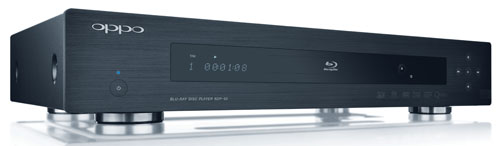 Oppo BDP-93 Blu-ray Player Then again, at $499, this player is three to four times more expensive than many of the good quality players in the marketplace. And it's simply more machine than most of you need. I am basing my premise on the variety of Blu-ray players that I have worked with over the last year. And I am focusing this Buying Guide on these Blu-ray players from major manufacturers like, (listed in alphabetical order), LG, Panasonic, Samsung, Sharp, Sony, Toshiba, and Vizio. Where you can find differences (though often subtle) among the players is in their features, which make up the Checklist.  
To watch 3D movies at home, you need a 3D TV. If you don't have one, you don't need to buy a 3D Blu-ray player. To take that a step further, I suggest that you don't buy a 3D Blu-ray player until you have purchased a 3D TV. Though the price between 3D and non-3D players has narrowed, there's no reason to spend the extra money on a feature that you can't use. If you do want a 3D player, I have not seen any difference in 3D quality between the models available. And it doesn't matter if your 3D TV requires the active shutter or passive polarizing glasses. Any of the 3D players will work fine with either. The 3D signal only passes through the HDMI connectors on the player and the TV, which means that you will need an HDMI cable. Look for the "High Speed HDMI" designation on the cable or that it says that it is 3D capable. No matter what the salesperson might tell you, you do not need to spend a lot of money on a High Speed HDMI cable. You can find plenty of reliable ones online for under $10 for a six foot cable.  The era of streaming content from the Internet onto our TVs is upon us. This past year, the floodgates have burst open and we are inundated with movies from providers like Netflix and Vudu and tens of thousands of hours of YouTube videos. If you have an HDTV that cannot connect to the Internet, then buying a Blu-ray player that can is an inexpensive way to add this ability to your setup. In fact, I would consider Internet connectivity at the top of my Blu-ray player Checklist - even if your HDTV provides this feature. To be very clear, to use an Internet capable Blu-ray player, you will need Internet service in your house. Then by connecting the player to your home network through a router, you can stream content like movies from Netflix through your player to your TV. Also, if you are serious about obtaining good picture quality when you are streaming movies, you will need fairly fast and robust bandwidth from your Internet provider, ideally around 10Mbps. I know some sites suggest as low as 2.5Mbps, but if anyone else in your house is accessing the network, the video playback will deteriorate. At least try to have around 5Mbps.Luckily, many Internet providers are now offering service with speeds up to 60Mbps. See if the speed you now have works for your streaming needs and then rev it up if you require more. When Internet connected Blu-ray players first gained popularity last year, the number and quality of the providers varied dramatically from one player to another. 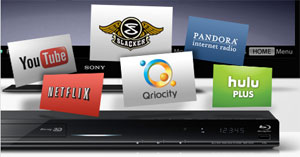 A Sample of the Sony Content Providers That's not the case with most of the 2011 models as the major manufacturers have struck agreements with heavyweights like Netflix, Vudu, Amazon Video on Demand, YouTube and Pandora. If you have favorites, I suggest that you check on the manufacturers' websites to see if the player carries that provider. Though often a site will not post a full list of providers and the list can be amended with an upgrade to the player's firmware. One of the hidden benefits of plugging your Blu-ray player into your home network is the possibility of playing photos, music and movies directly from your computer or media server. Not all Blu-ray players have this ability and I won't vouch for Mac systems. In the player's literature, look for a reference to streaming content from a Digital Living Network Alliance (DLNA) enabled PC or device.  If you are like me, my router is two rooms away from my TV and neither I nor my significant other savors the idea of snaking a Cat 5 cable down the hallway and into the back of a Blu-ray player. With that said, I still prefer the speed and reliability of a wired connection over the wireless solution. It's also often much simpler to setup a wired network. If you choose to go wireless, some units like the LG BD670 have wireless integrated in the player and require no additional components. Others like the Sharp BD-HP35U come with a wireless adapter in the box that you attach to a USB port on the player. For the rest, like the Sony BD-S480, you will have to find and purchase a compatible wireless adapter.  I know there are many consumers out there who will swear by - or curse at - this manufacturer or the other. And even though Blu-ray players are becoming very similar, brand loyalty is still a valid factor in your purchasing decision. But if you are interested in a wide variety of Internet content providers then consider this scenario. Let's say you own a Samsung TV, which has its lineup of providers. If you then buy a Samsung Blu-ray player, it will, no doubt, include almost the same group. Now, if you picked an LG player, you can assume that most of the big names like Netflix and YouTube will be furnished. But since LG has forged its own set of partnerships, their lineup might include providers that Samsung's doesn't. Therefore you have expanded the number of content sources. That's just an example. The same might be true for Vizio, Toshiba, Sony, Sharp and Panasonic. Check their lists of content providers and think about mixing and matching brands when you are buying TVs and Blu-ray players.  Externally, the size and design of Blu-ray players are fairly homogeneous across models. Almost all of them are around 17" wide. The shortest are about 2" high and the tallest range up to about 3". Depth is commonly around 10 to 13". If you need to store it on a tight shelf, be sure to check the dimensions. As for color, you can find them in matte black, glossy black or dark, dark gray - occasionally with a silver accent. 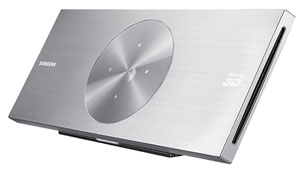 Samsung BD-D7500 I know the designers who slaved over every curve and detailing can't believe I'm saying this, but most of the Blu-ray players look the same. Since they are often hidden away in a cabinet, their appearance probably shouldn't be a major factor in your purchasing decision. To be fair, a few choices, like the wall-mountable Samsung BD-D7500, do stand out from the crowd. But expect to pay more for the styling, this Samsung's MSRP is $350.  When I wrote the first version of this Buying Guide, the Blu-ray format was still in its infancy and was experiencing growing pains. Manufacturers were testing out new technologies and DVD programmers were pushing the envelope on ways to present content. As a consequence, Blu-ray players did not always flawlessly playback Blu-rays, not even the movies from major studios. In 2011, that problem has almost disappeared. You should expect reliable playback of commercially produced DVDs and Blu-ray discs. If you run into trouble with one particular disc, take it back. If a variety of DVDs aren't playing well, return the Blu-ray player. Also, most manufacturers are responsible in providing firmware upgrades to their players, which can fix minor hiccups. And I always suggest that when you first setup your new unit that you check to see if you have the current firmware version. I recommend that when you buy your Blu-ray player, whether it costs $500 or under $100, give it a good test with a number of your favorite movies, both SD and Blu-ray and see how it performs.  Almost all Blu-ray players not only can playback Blu-ray and standard definition (SD) DVDs but also audio CDs. I'm talking about the normal commercial movies and music that you can purchase on Amazon or at Best Buy. Then there are all the various formats like BD-R/RE, CD (CD-DA), CD-R/RW, DVD+R, DVD+RW, DVD-R and DVD-RW - the type of discs that your Aunt Connie might send with the family reunion video or Bubba down the hall might burn of a bootlegged Katy Perry concert. If you have no idea what those acronyms stand for, then you probably don't need to worry about it because they are not the typical commercial movie or music formats. If you do have some of these discs, then I suggest you go online and dig through the player's specifications to see if it's compatible.  Many manufacturers add a USB port or an SD card slot on to their units, allowing you to plug in a USB flash drive or an SD card and access the content on them. One common usage is to download photos stored on your computer on to a flash drive. Pop it into your Blu-ray player and the images are displayed on your HDTV. Some players will only read JPEG photos from the drive. Others will also playback music and videos. If you are a fan of the DIVX video format, I have seen players that are DIVX friendly. (Once again, you will need to pore through specs to see what a player provides.) I can see the value of watching photos or videos stored on a flash drive, but I'm not a big proponent of listening to music on your TV, for two reasons. First, most TVs don't have an audio only feature where you can power down the screen. Without it, your TV is unnecessarily sucking electricity. And perhaps more importantly, the audio quality of most speakers built into TVs is just not that great. Now if you are routing your Blu-ray player through an A/V receiver and a dedicated speaker system, then that's a much sounder solution. Which brings me to another feature that is near and dear to many audiophiles that love their analog A/V receivers.  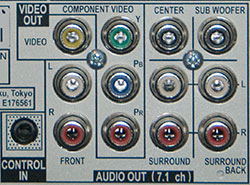 Pioneer's BDP-320 Nowadays, most folks use an HDMI cable to transfer both audio and video from the Blu-ray player. If not, they will route the player's audio digitally, through the SPDIF digital output. Either is a perfectly dandy solution. But there is a dedicated cadre of analog audio aficionados - you know who you are - that seek a Blu-ray with 7.1 analog audio outs, which are available on a few of the higher end players. Normally you will pay a premium for this feature. If you don't need it - most of you won't - save a little cash.  On a related note, some higher-end models, like the Samsung BD-D6700, have added a second HDMI output, which can be used in a variety of situations. For example, if your A/V receiver cannot pass through a 3D video signal, you can connect HDMI 1 directly to your 3D TV and HDMI 2 on the Blu-ray player can send audio to your receiver. Or if you have two displays like a TV and a projector, you can connect one to HDMI 1 and the other display to HDMI 2. Be sure to read the player's manual for the proper settings.  I almost left Power Consumption off my list because there's not a great deal of difference among Blu-ray players. But many players do include a power sucking feature that you can easily deactivate. It's usually called something like Quick Start mode, which shortens the start-up time when turning on the player. It also a quiet electricity piggie. Basically, with Quick Start turned on, your player is Hoovering power 24/7, which is ridiculous for a machine that you might use a couple of hours a day. This is one of the reasons that I don't discuss how quickly a player starts up and loads a disc. For me the minor time savings gained with a feature like Quick Start is not worth the constant power drain. If you are an ants-in-your-pants type, turn on the player, pop in a disc and pop some popcorn.  We cannot end this guide without talking about price, though it is not as imposing of factor as it once was. The marketplace is full of well performing models at prices starting around $100. Basically, how much you spend depends on what features on the checklist that you choose. For example, a built-in wireless adapter will add around $30 or so. A 3D player will tack on another $30 or $40. Of course, sales are always occurring and deals can be found online. Before you go hunting, make your list and check it twice. History of Blu-rays
Back in the days, all our TVs were fat, not flat, and had a resolution of 480i, which we now label, standard definition or SD. To match our SD TVs, movie studios recorded their films on to DVDs in the same 480 resolution. This format served us just fine until HDTVs began to take over the marketplace. As an economical stopgap solution, manufacturers retooled traditional DVD players so that they could upscale the standard definition, 480p, discs and output a 1080p signal to your HDTV. I admire how well players can upscale 480p content, which will allow you to enjoy your legacy collection of DVDs for years to come. But to upscale, a player is taking a limited amount of video information and filling in the gaps to try to recreate a good looking higher resolution image. Blu-ray players also can upscale SD DVDS. But even the newest most powerful video processors in the best high-end players can only perform so much magic with standard definition DVDs. The resolution on SD DVDs cannot supply enough data to create a high class, high resolution image. To optimize the picture quality on higher definition TVs requires higher resolution DVDs, which means inventing a technique to store more data on a DVD. To increase storage capacity, a blue laser diode recording process was developed over ten years ago. Movie studios now have gone back and rerecorded their movies on to Blu-ray discs at the superior 1080p resolution. 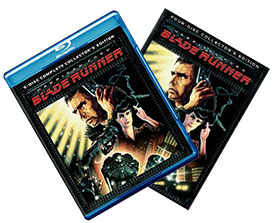 A Classic Remastered on Blu-ray Higher resolution translates to more detail, sharper images, and better color rendition that really makes your HDTV shine. Simply, the picture quality provided by a Blu-ray disc in a Blu-ray player is noticeably better than what can be achieved by upscaling an SD DVD. Blu-ray disc players were introduced in 2006. Their manufacturers fought a sometimes brutal, but thankfully short, war with Toshiba and others who supported HD DVD, the competing and incompatible high definition DVD standard. (Neither Blu-ray nor traditional DVD players can handle the HD DVD discs.) Toshiba surrendered in early 2008 and stopped developing HD DVD players. |
Bookmark:
 del.icio.us
 Reddit
 Google
Reader Comments
Posted Apr 18, 2011 11:14:24 AM |
|
By Chuck Cohen, DVM |
|
Dick,
I called and spoke with a woman this morning who suggested I write you. This question, I believe, is regarding what DVD player manufacturers refer to as the "idle time." It seems to be defined as the period of time between when an image on a DVD is "paused" using the controller and then reverts back to the player's start-up screen. In my case, using a 14- month old Samsung BD-P 1600 unit if I put on an artist's DVD which is a series of maybe 80 prints accompanied by music I would like to be able to pause or freeze on a specific image to display during dinner or for anyplace from 1-3 hours. The reasons and related points are:
1) Continuously advancing images can be disturbing to a conversation. 2) Display on a DLP TV (like our wonderful new generation Mitsubishi Diamond series 65838 unit) can be done without any screen burn in. 3) The quality of the display rivals the $5-10,000 works of back and front lit art on metal surfaces or imbedded in acrylic (like at the Peter Lik Studio in La Jolla).
So, Samsung tells me the idle time is "built in" and cannot be altered. I would like to think that Mitsubishi has been more expansive in their thinking.
At any rate, your thoughts would be much appreciated. I'm a veterinarian in Marina Del Rey, CA. If you have any pet questions I'm happy to return the favor.
Chuck Cohen Cell: (203) 824-4969 Email: cacohendvm@gmail.com
| Send this Page | Print this Page | Report Errors |

Posted Sep 18, 2011 6:37:35 AM
By Chuck Cohen
I like to use my Mitsubishi 65" DLP TV to display non-movie DVDs such as jellyfish, seahorses and art. In addition, i use an Apple TV and iPhone to view art downloaded to my iPhone, etc. I would like to display frames from DirecTV saved videos or purchased artist's videos; however, freezing frames results in the DVD player timing out after just s few minutes and reverting back to it's startup screen znd after about 20 minutes completely shutting off. All of which, I assume, is designed to protect most DVDs from burn in. Are there units that give us greater flexibility?
Thanks,
Chuck Cihen
The Question??? Is it possible to alter these shut down times, etc ? I hear there may be commercial DVD players