
|
|
 |

|


|
Samsung BD-P3600 Review
Blu-ray Player, $399
Dick De Jong Introduction
Samsung has introduced three new Blu-ray players, the BD-P1600, BD-P3600 and the BD-P4600. All of them, even the $299 BD-P1600, are Profile 2.0 BD-Live players, and each includes Netflix (movie) and Pandora (music) streaming capabilities. The BD-P3600 stands out from its two siblings because it supplies 7.1 analog audio outputs which are essential for home theater enthusiasts with non-HDMI equipped receivers. Perhaps surprisingly, the ultramodern designed and more expensive ($499) BD-P4600 only furnishes stereo analog audio outs. Since I'm a Netflix subscriber, I think that Samsung's partnership with Netflix is a real plus for these Blu-ray players. But if your TV viewing room is not wired for the Internet, the big bonus is that all three of these units provide wireless connectivity. Samsung even packages a wireless adapter with the BD-P3600 and 4600. Of course, the foundation for any Blu-ray player is high quality audio and video performance and the BD-P3600 does not disappoint. Blu-ray Player Primer
Blu-ray disc players were introduced in 2006. Since then, their specifications have evolved through three classifications, (Profile 1.0, 1.1 and 2.0). Profile 1.0 provided playback and basic interactive features. Profile 1.1, (also called BonusView), players added the capability for displaying Picture-in-Picture (PIP) and playing secondary audio tracks available on BonusView discs. 
After October 31, 2007, all new Blu-ray players had to offer all the features in Profile 1.1. BD-Live (Profile 2.0) players must have an Ethernet port for connecting to the Internet, where it can download online content associated with BD-Live Blu-ray titles. Out of the Box
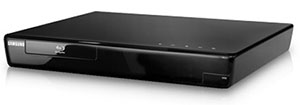
From a distance, the BD-P3600 with its glossy black finish looks nondescript. Upon closer inspection, you see that the designers have sculpted the unit with curved edges and a top that slants down to a slightly smaller base. 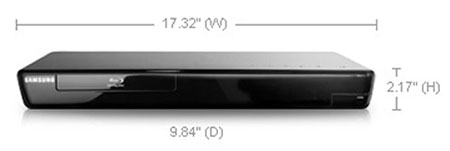 The biggest departure from standard DVD players is the placement of the operational buttons on the top instead of on the front face. 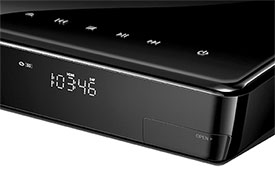
Even though I almost always use the remote, I like the convenience of the buttons on the top. They especially come in handy when I am loading a DVD. Of course, to take advantage of this location you need to place the player on the top of your stack of equipment. Also, if you look closely, a flip down door (labeled Open) on the front right corner conceals a USB port. On the back, the connection panel supplies one HDMI out and one set of Component Video (YPbPr) outs. A Composite out (with a pair of Audio stereo outs) is also included. Though practically, you should only use the Composite as an option of last resort for troubleshooting. On the audio side, in addition to the stereo outputs, the BD-P3600 provides those 7.1 channel analog outs along with an optical Digital Audio out. When you add in the HDMI cable, you have four ways of relaying the audio signal. 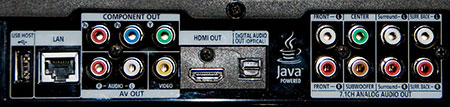 The BD-P3600 internally decodes advanced audio formats including Dolby Digital Plus, Dolby TrueHD, DTS-HD High Resolution and DTS-HD Master Audio. The BD-P3600 supplies two USB ports, one on the front and one on the back. Both will accept flash drives, though not simultaneously. You can playback JPEG photos, MP3 audio files or DivX video clips on the drives. (Please note that whether from a flash drive, a CD or a streaming PC, DivX is the only video file format supported by the BD-P3600.) Either USB port can serve as a Service port for firmware updates. (The BD-P3600 also can download updates directly from the Internet.) If you are accessing BD Live features on a Blu-ray disc which may require additional storage, you can attach a flash drive to either port. The 802.11 wireless adapter can only be plugged into the USB port on the back. When attached, the adapter sticks out a little over two inches. If you are placing the BD-P3600 in tight quarters, Samsung includes a handy little USB L connector, which will allow you to hug the adapter along the back of the deck. Or if you are old school, you can simply plug a network cable into the LAN port. 
In previous reviews, I have discussed the sense of empowerment that Netflix streaming gives. The notion that one has over 11,000 movies at your fingertips can make even a grizzled cineaste weep. For the music maven, Samsung has linked up with Pandora, a free streaming Internet radio service. After activating your BD-P3600 on the Pandora website, you create your own stations by supplying favorite artists, songs or composers. For example, Pandora designed a Rufus Wainwright station for me. Rather than playing Rufus 24/7, Pandora, (based on its Music Genome Project database), selects a range of compatible songs by various artists. If you are planning on using both the Netflix and Pandora streaming features, then make sure that your Internet Service Provider is supplying you ample bandwidth, with download speeds of at least 2.5 Mbps. Over 5 Mbps would be better if you want high quality streaming from Netflix. 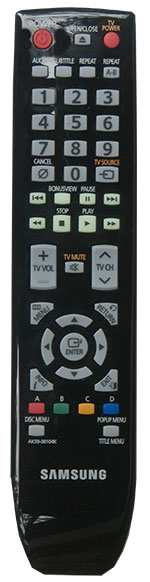
Samsung makes remote controls that fit comfortably in your hand, which might seem like a small detail but it shows a sensitivity to you, the consumer. The glossy black remote is non-backlit, but after being exposed to sunlight, the basic control keys in the middle glow green in the dark. I wish that I could access some of the player's menu items while watching a DVD, but you must stop the DVD before you can open the menu for the BD-P3600. Because this Samsung is feature-rich, the menu is not as uncomplicated as I would prefer. You often have to punch a number of buttons to reach your destination in the sub-menus. Then again, if I have to choose, I'll take the features even if it means more navigation through the menus. Power Consumption
The EPA is now publishing a list of ENERGY STAR qualified TVs. (You can find it here.) But the EPA is still in the midst of setting testing procedures for the Version 2.0 ENERGY STAR Audio/Video Specification, which includes devices like Blu-ray players and AV receivers. It will probably take another few months before the EPA will begin to generate a list of ENERGY STAR qualified Blu-ray players, therefore, we ran our own set of power consumption readings. To measure power, we hooked the BD-P3600 up to our watt meter, called Watts up? Pro, and took a reading during playback of a Blu-ray movie and another in standby mode. During playback, the meter ranged between 21.9 and 22.4W. If I stopped playing but still had the disc in, the meter hovers around 18W. When I turned the power off, the meter plummeted to 0 and didn't budge. I'm glad to see that this new Samsung model exhibited this zero or near zero standby mode. The earlier BD-P1600 didn't drop so low in standby and also took more power during playback. I know Samsung has made great strides in reducing power consumption in their new HDTVs. It's gratifying that they are also greening their Blu-ray players. Setup
The more Blu-ray players that I review, the more I realize how young this technology is. Let's just say they haven't hit puberty yet. And like any growing child, they are constantly outgrowing their clothes. In Blu-ray terms, that means the need for seemingly constant firmware updates. I would suggest the first thing you do after connecting any new Blu-ray player to your TV is check to see if your player has a firmware update that you can download from the manufacturer's website. With this Samsung, you have three options. Download the file to your computer and then copy it to a flash drive which you can insert in one of the USB ports on the BD-P3600. Or you can burn the file to a CD, which you insert into the player. Or you can hook the player directly to the Internet and download the firmware update straight into the unit. 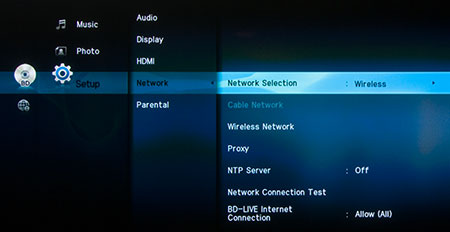 If you decide to connect the BD-P3600 to the Internet, you will need to setup the Network feature. If you have any network experience, the process is fairly straightforward. As a reminder, you will need an Internet connection to take advantage of BD-Live content available through a Blu-ray DVD. Now, there is a second networking function that I particularly like, the ability to connect the BD-P3600 into your home network. Then you can access JPEG photos, MP3 music and DivX video directly from a shared folder on your computer. 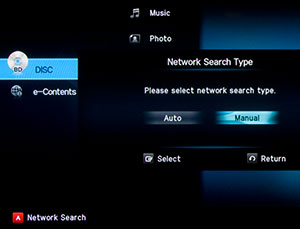
The catch is that setting up this link can be a little tricky. As a Samsung representative said, "there are thousands, if not tens of thousands of different PC configurations - not to mention the countless different routers, network types, and service providers." Luckily, I received some assistance from the rep and I was successful in linking the BD-P3600 to my computer. I will not try to explain the process in this review. You can email me and I will share the details. After dealing with network connections, the rest of setup is a piece of cake. You can work your way through the sub-menus quickly and easily. If you have questions, the manual is informative and helpful. To use Netflix or Pandora, you will need to go onto your computer and register your BD-P3600 on both the Pandora and Netflix sites. Netflix is a paid monthly subscription. Pandora is free. For the videophiles in the crowd, Samsung does not furnish any picture controls on the BD-P3600. I am seeing some other top end Blu-ray players that offer an extensive list of picture adjustments. If you have a high quality HDTV with multiple HDMI inputs, I don't believe you'll feel deprived by this Samsung's lack of tweaking tools. Performance
I'm running out of ways of expressing how good playback of Blu-ray discs looks and sounds. The performance of the BD-P3600 simply adds to the list of superlatives. Picture quality is crystalline and audio is as good as your sound system. The BD-P3600's upconversion of standard definition DVDs will make you glad that you didn't dispose of all those old DVDs in a garage sale. But I'll continue to repeat, "there is a noticeable difference between SD and Blu-ray DVDs." With that said, I am not an unswerving fan of Blu-ray technology. On every player that I have encountered, I have run across at least one glitch in playback of Blu-ray discs. For example, I just received a copy of the Director's Cut of the Watchmen. It contains a feature called Maximum Movie Mode. Some of the Blu-ray players that I have in for review (including this Samsung) hiccup when I try to access this content. Others don't. 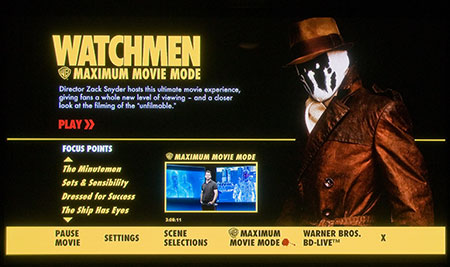 Then again when I try to tap into the BD-Live content through the Transformers disc, the BD-P3600 acts like a champ. While those that handled Watchmen turn into chumps with Transformers. Curiouser and curiouser. I can only imagine that these compatibility issues make tech support personnel invoke the sacred and profane in their restless nights. With its ability to decode advanced formats including Dolby Digital Plus, Dolby TrueHD, DTS-HD High Resolution, and DTS-HD Master Audio, the BD-P3600 is pumping high octane audio fuel. If your sound system is an old clunker, it will run better, but don't expect to set any land speed records. For those home theater speed racers who gotta Bugatti, fuhgeddaboudit. Value
As I scan the online retailers today, I see that the street price of the BD-P3600 is still the same as the MSRP. I consider the wireless connectivity and the Netflix and Pandora streaming are bonuses, but my recession era parsimony wishes the price of this high-end machine would lose some altitude. 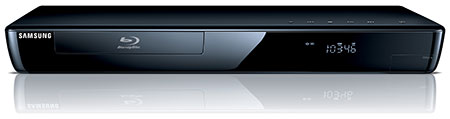 Indeed, if you don't need 5.1 or 7.1 analog audio outputs, you can attain all of the other features in the $300 Samsung BD-P1600. (The 1600 is wireless but does not come with the adapter. It also doesn't support DivX video.) Conclusion
With 7.1 analog audio outputs and superior picture quality, the Samsung BD-P3600 Blu-ray player is a great choice for a home theater with a non-HDMI equipped receiver. With the added capability to wirelessly connect to the Internet and your home network, this player can become a vital cog in a home media system. |
Bookmark:
 del.icio.us
 Reddit
 Google
Reader Comments
Posted Sep 20, 2015 10:48:11 AM |
|
By Ralph Shaw |
|
Posted Mar 16, 2014 3:15:50 AM |
|
By Dan Huff |
|
Posted Feb 11, 2012 8:59:07 PM |
|
By John |
|
Posted Jan 26, 2012 7:44:33 PM |
|
By Gary Loggains |
|
Posted Jan 16, 2012 8:57:45 PM |
|
By amanda |
|
Posted Nov 20, 2011 11:11:20 PM |
|
By john |
|
Thank You
shadow69_6@yahoo.com
Posted Oct 4, 2011 9:46:09 AM |
|
By Alan Dismuke |
|
Posted Jun 19, 2011 12:28:16 PM |
|
By Optoma HD20 Best Price |
|
Posted Jun 19, 2011 12:22:44 PM |
|
By Optoma HD20 Best Price |
|
Posted Mar 5, 2011 5:29:02 PM |
|
By Cynthia |
|
Posted Feb 14, 2011 11:07:18 AM |
|
By Brian |
|
Posted Feb 3, 2011 10:42:50 PM |
|
By aVol2 Help |
|
Posted Feb 1, 2011 12:28:08 PM |
|
By Morgan |
|
Posted Jan 25, 2011 8:05:56 PM |
|
By Liesel Ray |
|
Posted Jan 23, 2011 5:27:17 PM |
|
By Luke D. |
|
The router I'm using is a Linksys with a model number of... WRT120N
Thanks for your quick response and your time.
Posted Jan 23, 2011 3:45:19 PM |
|
By moodiahmed |
|
Posted Jan 22, 2011 8:26:16 PM |
|
By Luke D. |
|
Thank You!
Posted Jan 22, 2011 3:59:24 PM |
|
By moodiahmed |
|
Let me help you with the gateway pings.
1. If wireless (not built in), LAN Adapters must be Samsung ones. 2. a. goto menu, setup, network type wireless, then network setup, set the internet configuration protocol to AUTO and select your wireless network, enter the password (Case sensitive, use the red A button to toggle between capital letters, small letters and special characters. (TV Case) 2. b. goto settings, Network, Network type wireless, network settings, Internet configuration protocol is set to AUTO, select your wireless network, enter the password (Case sensitive) (Bluray Case).
Some of you will get error message some others will get through. Just notify me with the errors you will get and tell me the model of your LAN adapters.
Posted Jan 19, 2011 5:48:46 PM |
|
By Mary Lynn |
|
I'm running OSX 10.5.8 so I don't know if your tips on setting up Netflix & Blu-ray up will help me, but if you could email it I'd appreciate it greatly! ML
Posted Jan 11, 2011 7:59:01 AM |
|
By Dennis Miller |
|
Posted Jan 11, 2011 6:39:24 AM |
|
By allen |
|
Posted Jan 2, 2011 11:54:54 AM |
|
By Bruce Bingham |
|
Posted Dec 28, 2010 5:37:55 PM |
|
By bryan |
|
Posted Dec 23, 2010 6:43:42 PM |
|
By MaryAnn |
|
I'm in Canada, I get Youtube, yahoofinance, weather, etc., on my internet attached HDPlasma TV but it is limited to the apps on the tv. Of course, none of them are Netflix or access to the web.
And I was told by Samsung, that my player the Bd-P3600 made in Mar.2009 is TOO OLD to get Netflix. There isn't an upgrade/program/nothing! to allow it to get Netflix. I find this impossible to believe. What do you say? How do old players and tvs get Netflix?
Posted Dec 23, 2010 5:49:13 AM |
|
By wade |
|
Posted Dec 22, 2010 3:32:58 PM |
|
By Warren |
|
Posted Nov 27, 2010 8:44:59 PM |
|
By Cristal |
|
Posted Nov 23, 2010 5:47:06 PM |
|
By Eric |
|
Posted Nov 20, 2010 10:12:53 PM |
|
By Mike |
|
Posted Nov 5, 2010 3:27:17 PM |
|
By Adam |
|
Thanks for your help!
Posted Oct 29, 2010 9:04:45 PM |
|
By Greg Ward |
|
Posted Oct 3, 2010 12:52:22 PM |
|
By Koko |
|
Thanks! If needed I'll send my email address.
Posted Sep 26, 2010 3:17:24 PM |
|
By Stuart L |
|
Posted Sep 25, 2010 11:49:05 PM |
|
By Ian |
|
Posted Sep 17, 2010 5:17:59 PM |
|
By Jesse Lowe |
|
Posted Sep 15, 2010 11:56:09 AM |
|
By Joe Davis |
|
Thanks and kind regards Joe
Posted Sep 14, 2010 10:48:31 AM |
|
By Butch Freeman |
|
Posted Sep 11, 2010 2:22:44 AM |
|
By Antwan |
|
Posted Sep 4, 2010 1:36:36 AM |
|
By Glenn |
|
Posted Aug 27, 2010 12:43:26 AM |
|
By Ron |
|
Posted Aug 24, 2010 3:27:41 PM |
|
By Doug Graham |
|
Posted Aug 24, 2010 11:19:36 AM |
|
By Kaitlyn |
|
Thank you so much!
Posted Aug 8, 2010 7:56:40 AM |
|
By Leo |
|
Posted Jul 31, 2010 4:14:05 PM |
|
By Kristen |
|
Thanks so much!!!
Posted Jul 29, 2010 3:05:52 PM |
|
By Wayne Larson |
|
Thanks for your help
Posted Jul 2, 2010 7:25:16 PM |
|
By tom |
|
Thanks!!
Tom
Posted Jun 25, 2010 9:23:43 AM |
|
By Jerome |
|
Thanks
Posted Jun 21, 2010 3:29:53 PM |
|
By Nilly |
|
Posted Jun 15, 2010 6:19:19 PM |
|
By Kelly Monthei |
|
Posted Jun 8, 2010 4:29:40 PM |
|
By abrinton |
|
Posted Jun 6, 2010 6:58:17 AM |
|
By Debbie |
|
Posted Jun 2, 2010 8:33:22 PM |
|
By Peter |
|
Thank You Peter pullicino
Posted May 19, 2010 7:39:56 PM |
|
By aldo |
|
Posted May 8, 2010 12:20:52 PM |
|
By dillon324 |
|
Posted May 8, 2010 9:53:10 AM |
|
By fred stith |
|
Posted May 6, 2010 4:45:27 AM |
|
By Debbie |
|
Posted May 3, 2010 7:30:02 AM |
|
By Nancy |
|
Posted May 1, 2010 11:44:50 AM |
|
By Laura |
|
Posted Apr 25, 2010 4:49:12 PM |
|
By Betty Harral |
|
Posted Apr 18, 2010 1:07:12 PM |
|
By Ken |
|
Posted Apr 18, 2010 6:04:53 AM |
|
By Joe |
|
Posted Apr 16, 2010 9:47:19 AM |
|
By Frank Woodruff |
|
Posted Apr 13, 2010 6:48:15 PM |
|
By Angela |
|
Posted Apr 11, 2010 10:20:57 AM |
|
By Bandog |
|
Posted Apr 11, 2010 8:50:02 AM |
|
By Durphy D. |
|
Posted Apr 6, 2010 1:36:30 PM |
|
By Barry |
|
Help!
Posted Apr 5, 2010 6:11:12 PM |
|
By rob |
|
Thanks Rob
Posted Apr 2, 2010 12:14:04 PM |
|
By Janine Turnbull |
|
Posted Mar 30, 2010 11:52:53 PM |
|
By Mike |
|
Posted Mar 20, 2010 1:49:25 PM |
|
By Joe |
|
Posted Mar 17, 2010 1:56:54 AM |
|
By Ken in Honolulu |
|
I tried an external USB drive, which was fine for pictures and AVIs, but NO music files showed up in the album folders.
All sharing and permissions are apparently right. This is more than frustrating. BUT - Pandora and Netflix work great...
Thanks in advance,
Ken
Posted Mar 14, 2010 3:09:40 PM |
|
By Buck |
|
Posted Mar 12, 2010 11:24:50 AM |
|
By shyam |
|
Posted Mar 10, 2010 10:17:28 PM |
|
By Dick De Jong |
|
Again, anyone who is having problems can email me and I will send the documents that I received from Samsung tech support. I probably have responded to over 100 separate requests.
Posted Mar 10, 2010 9:38:16 PM |
|
By Loveit |
|
Netflix works great, Pandora I love, just have yet to connect it to my sound system, was just excited to try out the feature. Pandora is free, love it, Netflix, 2 week free trial, still have to check out blockbusters streaming selections.
So far, I love what I have and happy I have it.
Posted Mar 8, 2010 2:13:51 PM |
|
By Arnaud Didierlaurent |
|
Posted Feb 26, 2010 6:21:55 PM |
|
By Rob L |
|
Posted Feb 22, 2010 8:05:57 AM |
|
By jerry hammer |
|
Posted Feb 21, 2010 4:50:56 PM |
|
By Mark |
|
Posted Feb 9, 2010 12:22:08 PM |
|
By KEN |
|
Posted Feb 8, 2010 7:24:41 PM |
|
By Gary |
|
I'm having the same problems as everyone else though, YouTube works and I can hook up to the computer but the shared folder shows as empty.
Please send me a copy of the fix or trick!
Posted Feb 7, 2010 4:15:17 AM |
|
By Tiszone |
|
Posted Feb 5, 2010 7:21:47 PM |
|
By Alan |
|
Posted Feb 1, 2010 6:56:27 AM |
|
By mike b |
|
Posted Jan 25, 2010 1:59:25 PM |
|
By Gordon Andrew |
|
Posted Jan 24, 2010 3:43:31 PM |
|
By Conor |
|
Posted Jan 24, 2010 12:18:41 PM |
|
By nick |
|
Posted Jan 23, 2010 9:14:30 PM |
|
By tonyj |
|
Please send me the information on how to connect my samsung BD3600 to my home network
Posted Jan 23, 2010 6:59:49 PM |
|
By nick |
|
Posted Jan 23, 2010 2:11:36 PM |
|
By alex vescan |
|
Posted Jan 22, 2010 8:27:09 PM |
|
By Tricky |
|
Posted Jan 19, 2010 7:48:44 PM |
|
By R. Brown |
|
Posted Jan 19, 2010 11:39:31 AM |
|
By Robin Gibb |
|
Posted Jan 19, 2010 11:11:59 AM |
|
By Stephen |
|
Posted Jan 18, 2010 7:51:49 AM |
|
By Robert |
|
Posted Jan 17, 2010 2:32:05 PM |
|
By Cathy |
|
Posted Jan 16, 2010 2:07:15 PM |
|
By dan lane |
|
Jon
Posted Jan 10, 2010 10:09:54 AM |
|
By Dennis |
|
Posted Jan 9, 2010 9:43:21 PM |
|
By Jeff Lloyd |
|
Posted Jan 7, 2010 5:02:22 PM |
|
By braar02 |
|
Posted Jan 5, 2010 1:15:21 PM |
|
By Dave Loiselle |
|
Posted Jan 5, 2010 8:57:10 AM |
|
By Reece |
|
Posted Dec 29, 2009 2:21:58 PM |
|
By Kenneth |
|
Please let me know how I can connect the two units?
Regards Kenneth
Posted Dec 29, 2009 7:48:27 AM |
|
By Dan |
|
Posted Dec 26, 2009 10:02:38 PM |
|
By Brad |
|
Posted Dec 26, 2009 12:47:49 AM |
|
By Forrist Richardson |
|
Posted Dec 24, 2009 7:29:34 AM |
|
By andres |
|
Posted Dec 22, 2009 11:20:48 AM |
|
By Christian Lanthier |
|
Thanks a lot in advance.
Posted Dec 17, 2009 8:47:30 AM |
|
By BernLagan |
|
I have just set up our new BD-P4600. Much to my own surprise I got it working through the wireless system. It works fine on Netflix. Also with YouTube. But the problem ,. having logged onto YouTube once with my password etc, it will no longert recognise my YouTube password. Si can no longer long to YouTube. Any suggestions other than closing down my YouTube acct and starting a new one?
Cheers
Bern
Posted Dec 16, 2009 8:38:21 AM |
|
By Tareq Fares |
|
Someone PLEASE help me, no one seems to know what to do.... Help is greatly appreciated.
Posted Dec 15, 2009 5:07:21 PM |
|
By Brian L |
|
Posted Dec 13, 2009 1:17:24 PM |
|
By Bill |
|
Posted Dec 12, 2009 4:08:27 PM |
|
By Phil |
|
Posted Dec 7, 2009 7:04:02 PM |
|
By Skyler |
|
Posted Dec 7, 2009 3:46:37 PM |
|
By scott |
|
Posted Dec 6, 2009 7:38:48 PM |
|
By Adam M |
|
Posted Dec 5, 2009 7:08:30 PM |
|
By Doug |
|
Posted Nov 22, 2009 1:34:26 PM |
|
By Kurt |
|
Posted Nov 21, 2009 9:13:40 PM |
|
By Ken |
|
Thanks Ken
Posted Nov 17, 2009 1:13:43 PM |
|
By Ian Pitt |
|
Please help as its bugging the hell out of me :(
Thanks in advance
Ian
Posted Nov 3, 2009 7:30:29 PM |
|
By Galaad |
|
To all who have problems visualizing media in his bluray player trough home network: If in your computer you are administrator, dont put password or otherwise in your bd player put the password that you have. Other things to remember: 1.-in your net security options let the bd player free of restrictions or let the "new devices" free. 2.- Put the media that you want in "shared" files. 3.- In the bd player, once you have search the network(i recomend automatic) choose the right "user" if are more than one. I hope this be useful,and dont have problems with this anymore.
Greetings from Mexico. G.
Posted Nov 1, 2009 7:27:47 AM |
|
By Bernie Bricker |
|
I have found my computer, I type in the computer name as it shows , but then it asks me for a password. I put in all the passwords I know and also left it blank, with no luck. Do I need to set up a password on my desktop (win7)? My router is hardwired from BR to lynksys router. Thanks.
Posted Oct 31, 2009 10:28:22 AM |
|
By Jim Butler |
|
Could you please post or send me the instructions on how to set up the wireless connections D-Link DIR D55. I have been unable to get past the gateway ping on the network test and I do have this function enabled on the router.
Posted Oct 26, 2009 4:50:51 PM |
|
By Surfotog |
|
Posted Oct 26, 2009 8:46:45 AM |
|
By Serg |
|
Posted Oct 22, 2009 11:14:27 PM |
|
By Sara Corripio |
|
Posted Oct 11, 2009 8:07:49 AM |
|
By Marianne Alejandro |
|
Posted Oct 8, 2009 1:58:30 PM |
|
By New Blue Ray BD P3600 |
|
Please can you send me the info needed.
Thank you very much.
Posted Oct 7, 2009 9:54:54 AM |
|
By Terry Kieley |
|
Thanks, tekieley
Posted Sep 22, 2009 3:32:02 PM |
|
By Joe Staffa |
|
Posted Sep 20, 2009 5:07:07 PM |
|
By gemma |
|
Please can you send me the info needed.
Thank you very much.
Posted Sep 11, 2009 11:31:30 PM |
|
By Jerry |
|
Posted Sep 10, 2009 3:10:42 AM |
|
By Eslite |
|
Posted Sep 9, 2009 9:36:41 PM |
|
By john o |
|
Posted Sep 6, 2009 5:36:06 PM |
|
By John |
|
Posted Aug 25, 2009 2:07:08 PM |
|
By Dick De Jong |
|
I am sending you that information directly to you. If other readers are interested I will post it to you. Just let me know.
Posted Aug 24, 2009 8:50:47 PM |
|
By Marivaldo Filho |
|
Thanks in advance
| Send this Page | Print this Page | Report Errors |

Posted Apr 19, 2017 11:22:27 AM
By Ravi